Let’s be honest, anyone can turn on a PPC campaign. The hard part is making it actually bring in real leads without wasting money.
I’ve worked on a lot of pay-per-click campaigns, and I’ve seen the same mistake over and over: businesses spend big on Google or Facebook ads, get plenty of clicks, and then… nothing. No calls. No sign-ups. No customers.
The difference between ads that just get traffic and ads that bring in qualified leads usually isn’t complicated; it comes down to a few smart choices most people overlook. Here’s what actually makes PPC campaigns convert.
Understanding the Conversion Funnel Before You Spend a Dime

Too many businesses jump into PPC thinking they can just throw up some ads and watch the leads roll in. That’s not how this works.
Your conversion funnel has stages, and your PPC strategy needs to address each one. Someone who’s never heard of your business needs a different message than someone who visited your pricing page twice last week but hasn’t pulled the trigger yet.
At the top of the funnel, you’re dealing with cold traffic people who have a problem but don’t necessarily know you exist. Middle-funnel prospects are comparing options and doing research. Bottom-funnel leads are ready to buy; they just need the right nudge.
Most failed PPC campaigns make one critical mistake: they use the same ad copy and landing page for all three stages. That’s like using the same pickup line on a first date and a marriage proposal. Context matters.
Build campaigns that speak to where people are in their decision-making journey. Create separate ad groups for awareness, consideration, and decision-stage keywords. Your conversion rates will thank you.
Writing Ad Copy That Actually Compels Action

Here’s what doesn’t work in PPC ad copy: generic statements about being “the best” or having “great service” or offering “competitive prices.” Everyone says that. Your prospects have seen those phrases so many times they’ve become invisible.
Your ad copy needs to do three things in a very limited character count: grab attention, communicate specific value, and give people a compelling reason to click right now instead of later.
Start with the pain point. If you’re a plumber running ads, “Leaking pipe flooding your basement?” hits harder than “Professional plumbing services.” One creates urgency; the other creates a yawn.
Your headline should speak directly to the problem your prospect is experiencing at this exact moment. Then your description should promise a specific outcome, not vague improvements. “Stop water damage in 60 minutes” beats “fast emergency service” every single time.
Include numbers when possible. They stand out in a sea of text and give concrete expectations. “Free quote in 15 minutes,” “Save up to 40% on energy bills,” or “24/7 emergency response” all work because they’re specific and measurable.
And for the love of all things holy, use strong calls-to-action. “Get Started,” “Request Quote,” “Schedule Now” tell people exactly what to do next. Don’t make them guess.
Landing Pages That Convert (Not Just Look Pretty)

Your ad did its job when someone clicked. Now your landing page needs to close the deal, and this is where I see most campaigns fall apart.
You cannot, absolutely cannot, send PPC traffic to your generic homepage. Homepages are designed for people who are browsing. Your PPC traffic has specific intent based on what they searched for. Honor that intent with a dedicated landing page.
Message matches are crucial. If your ad promised “commercial HVAC installation quotes,” your landing page better be about commercial HVAC installation quotes, not your entire service catalog. The headline on your landing page should echo the promise from your ad.
Remove distractions. No navigation menu with fifteen different links. No blog sidebar widgets. No cute About Us sections. Every element on a PPC landing page should move the visitor toward one goal: converting into a lead.
Your form shouldn’t ask for someone’s life story. Name, email, phone number, and maybe one qualifying question that’s it. Every additional field you add decreases conversion rates. You can gather more details during the sales call.
Social proof belongs on landing pages. Testimonials, review ratings, client logos, certifications these trust signals matter immensely when someone is deciding whether to hand over their contact information to a business they just discovered.
Page speed matters more than most people realize. If your landing page takes five seconds to load, you’ve already lost a huge chunk of your traffic. Optimize your images, minimize scripts, and test on mobile devices. Most PPC traffic now comes from mobile.
Targeting the Right Keywords (And Avoiding the Wrong Ones)
Keyword selection can make or break your PPC campaign profitability. You’re paying for every click, so clicks from people who will never buy from you are just money down the drain.
Start with high-intent keywords. These are searches where someone is clearly ready to take action: “emergency electrician near me,” “hire divorce lawyer Boston,” “book HVAC repair today.” These cost more per click, but they convert at much higher rates.
Don’t ignore long-tail keywords. Yes, “plumber” gets searched more than “licensed plumber for slab leak repair in Arlington,” but guess which one is cheaper and more likely to convert? Longer, more specific searches indicate someone who knows exactly what they need.
Use exact match and phrase match strategically. Broad match keywords can eat through your budget faster than you can check your campaign stats. When you’re just starting out, control is more valuable than reach.
Your negative keyword list is just as important as your target keywords. If you’re a high-end contractor, add “cheap,” “DIY,” and “free” as negative keywords. If you don’t serve residential clients, add “home” and “house.” These filters prevent wasted spend on clicks that will never convert.
Geographic targeting needs to be precise. If you only service a thirty-mile radius, don’t run ads to people fifty miles away just because it’s technically in the same metro area. They won’t use you, and you’ve wasted money on that click.
Bid Strategies That Maximize ROI Without Overspending
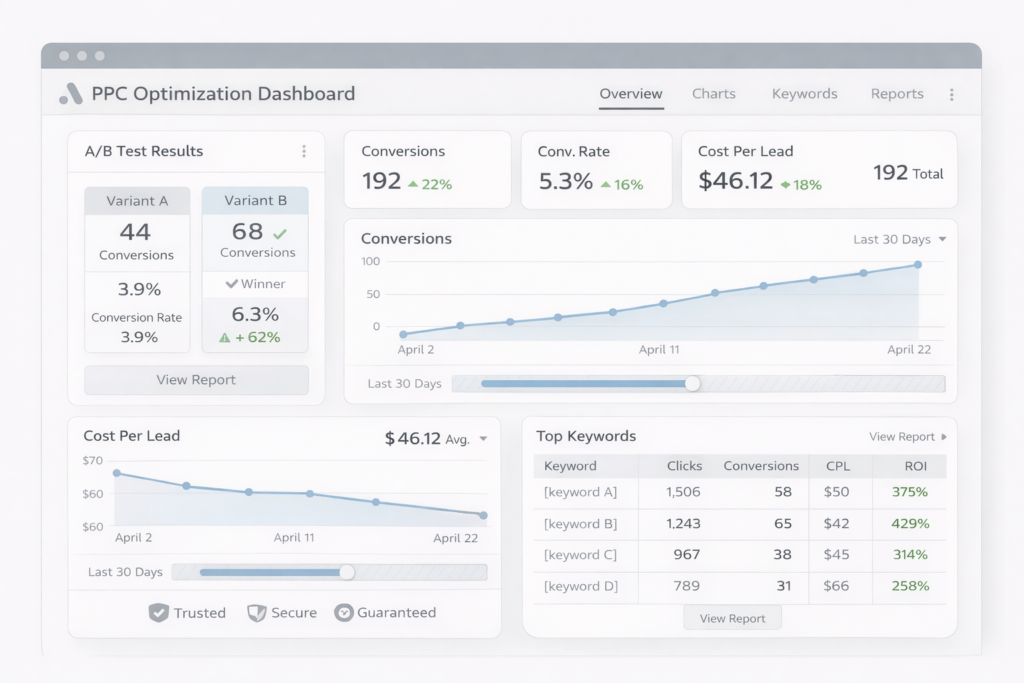
Bidding in PPC is both an art and a science, and too many businesses set it and forget it. That’s a mistake.
When you’re starting a new campaign, manual bidding gives you control and helps you understand which keywords actually drive conversions. Once you have conversion data, you can explore automated bidding strategies.
Don’t compete for the #1 position on every keyword. Sometimes positions 2-4 convert just as well and cost significantly less per click. Test different positions and track your actual cost per lead, not just cost per click.
Dayparting adjusting bids based on time of day can dramatically improve ROI. If you’re a B2B service provider and nobody converts after 6 PM, why are you spending full budget on evening clicks? Lower your bids during low-converting hours and increase them when your prospects are actively looking.
Device bid adjustments matter too. Mobile traffic might convert at different rates than desktop. If you see mobile users clicking but not converting, either adjust your mobile bids or fix your mobile landing page experience.
Set conversion-based bid adjustments. Google Ads lets you automatically increase bids for audiences more likely to convert people who’ve visited your site before, or users in certain demographics that historically convert well.
Don’t exceed your budget trying to compete for every impression. It’s better to dominate your best-performing hours and keywords than to spread yourself thin trying to show up everywhere all the time.
Retargeting: The Follow-Up That Actually Works
Only about 2-3% of website visitors convert on their first visit. That means 97% of your PPC traffic is leaving without becoming a lead. Retargeting brings them back.
Not all website visitors are equal. Someone who spent eight minutes reading your services page and checking your pricing is warmer than someone who bounced in ten seconds. Segment your retargeting audiences based on behavior.
Create different retargeting campaigns for different pages visited. Someone who looked at your commercial services shouldn’t see ads for residential offerings. Someone who downloaded your pricing guide should see testimonials and case studies, not introductory content.
Your retargeting ad creative should acknowledge that this person already knows about you. “Still researching HVAC contractors?” or “Ready to schedule that free estimate?” work better than treating them like a cold prospect.
Frequency caps prevent you from becoming that creepy brand that follows people around the internet. Showing your ad 3-5 times over a week is strategic. Showing it 30 times is harassment.
Retargeting works across platforms. Someone might click your Google Ad, not convert, then see your Facebook retargeting ad while scrolling through their feed. That multi-touch approach often gets the conversion that wouldn’t have happened otherwise.
Time-based retargeting matters. Cart abandoners should see ads immediately. Someone who visited your blog might need a 7-14 day nurture sequence before seeing aggressive conversion ads.
Split Testing Everything (Yes, Everything)
If you’re not testing, you’re guessing. And guessing is expensive in PPC.
Test one variable at a time. Change your headline and your image and your call-to-action all at once, and you have no idea which change affected performance. Isolate variables for clean data.
Your ad copy should always have at least two variations running. Google’s responsive search ads make this easier, but monitor which combinations actually drive conversions, not just clicks.
Landing page testing can double your conversion rates. Test different headlines, form placements, color schemes, testimonial positioning. Small changes create big impacts when you’re paying for every visitor.
Call-to-action button testing is shockingly effective. “Get My Free Quote” might outperform “Request Quote” by 20%. You won’t know until you test.
Image testing matters more than you’d expect. The right hero image can boost conversions; the wrong one can kill them. Test different styles: photos vs. graphics, people vs. products, close-ups vs. wide shots.
Don’t stop testing when you find a winner. Markets change, competitors shift, and ad fatigue is real. What works today might underperform next quarter. Continuous testing keeps your campaigns fresh and improving.
Run tests long enough to get statistical significance. Testing for two days with twenty clicks proves nothing. Wait until you have at least 100-200 conversions per variation before declaring a winner.
Quality Score: The Hidden Lever for Lower Costs
Quality Score is Google’s way of rating the relevance and quality of your ads and landing pages. Higher scores mean lower costs per click and better ad positions yet most advertisers barely pay attention to it.
Your Quality Score is based on three main factors: expected click-through rate, ad relevance, and landing page experience. Improve any of these, and your costs drop while your performance improves.
Ad relevance comes down to tight keyword grouping. Don’t throw fifty different keywords into one ad group. Create focused ad groups with 5-10 closely related keywords and write ad copy specifically for that theme.
Landing page experience rewards speed, mobile optimization, and relevance. If your landing page loads slowly, isn’t mobile-friendly, or doesn’t match your ad’s promise, your Quality Score suffers and your costs rise.
Use your keyword in your ad headline, description, display URL, and landing page headline. This relevance matching directly impacts Quality Score and, more importantly, convinces users they’re in the right place.
Click-through rate improvement helps Quality Score. Better ad copy that compels more clicks signals to Google that your ads are relevant and valuable to searchers.
A Quality Score of 7+ should be your minimum goal. Scores of 8-10 give you significant cost advantages. Anything below 5 means you’re overpaying for clicks and need to rebuild that campaign from scratch.
Budget Allocation Across Campaigns and Channels
You can’t be everywhere at once, especially when you’re working with a limited budget. Strategic allocation means putting money where it performs.
Start with one platform and nail it before expanding. Master Google Ads before adding Microsoft Ads. Get Facebook retargeting working before experimenting with LinkedIn. Spreading too thin means mediocre results everywhere.
Allocate budget based on actual performance data, not assumptions about which keywords “should” work. If your commercial service keywords convert at 8% and residential converts at 2%, your budget allocation should reflect that gap.
Set aside the testing budget separately. If your total budget is $3,000 monthly, allocate $2,400 to proven campaigns and $600 for testing new keywords, ad copy, or platforms. This balances stability with growth.
Don’t pause campaigns every time the budget gets tight. PPC platforms reward consistency. Campaigns that are constantly turned on and off lose momentum and historical data. Better to reduce daily budgets than to pause entirely.
Seasonal businesses need aggressive budget shifts. HVAC companies should pour budget into cooling campaigns in summer. Tax preparers need to go all-in January through April. Match your spend to when your prospects are actually searching.
Review budget allocation weekly at minimum. Markets shift, competitors adjust their spend, and seasonal trends emerge. What worked last month might be inefficient this month.
Mobile-First PPC Strategy
Mobile isn’t coming, it’s here. Over 60% of Google searches now happen on mobile devices, and that percentage is only growing.
Your mobile landing pages need to be faster than your desktop versions. Mobile users have less patience and slower connections. If your page doesn’t load in under three seconds, you’re bleeding conversions.
Click-to-call buttons are gold on mobile. When someone searches for “emergency plumber” on their phone, they want to call, not fill out a form. Put your phone number front and center with a tap-to-call button.
Form fields on mobile should be minimal and use appropriate input types. Phone number fields should pull up the numeric keypad. Email fields should show the email keyboard. These small UX details affect conversion rates.
Mobile ad copy should be even more concise than desktop. People scrolling on phones are in quick-decision mode. Get to the point immediately.
Location extensions matter more on mobile. “Near me” searches are predominantly mobile, and showing your proximity to the searcher can be the deciding factor in getting that click.
Test your landing pages on actual mobile devices, not just responsive design tools. How it looks on your computer’s mobile preview might not match how it actually performs on a phone.
Conversion Tracking: Measuring What Actually Matters
You cannot improve what you don’t measure. If you’re not tracking conversions properly, you’re flying blind and making decisions based on vanity metrics.
Set up conversion tracking before you spend a single dollar on ads. This seems obvious, but you’d be amazed how many businesses run campaigns for weeks without proper tracking.
Track multiple conversion types. Phone calls, form submissions, live chat initiations, download completions each action has value. Assign appropriate values to each conversion type based on your typical close rates.
Call tracking is essential for service businesses where most conversions happen over the phone. Use dynamic number insertion so you know exactly which keyword, ad, and campaign drove each call.
Don’t just track quantity; track quality. Ten leads mean nothing if none of them are in your service area or can afford your services. Build systems to mark leads as qualified or unqualified and feed that data back to your campaigns.
Attribution windows matter. Someone might click your ad today and call you next week. Default attribution settings often miss these delayed conversions. Adjust your conversion windows to match your typical sales cycle.
Use conversion data to optimize bids. If certain keywords or demographics convert at higher rates, increase bids there. If others waste budget, pause them or reduce bids dramatically.
The First 30 Days: Setting Up for Long-Term Success
Your first month of PPC won’t be your best month, and that’s okay. Think of it as building the foundation.
Start with a learning budget money you’re willing to spend gathering data even if it doesn’t immediately convert. This typically ranges from $1,000-$5,000 depending on your industry and market.
Keep campaigns simple initially. One campaign per service line or product category. Tight ad groups around focused keyword themes. Don’t get fancy until you understand what works in your market.
Daily monitoring is crucial in the first two weeks. Check your campaigns every day, look for wasted spend, add negative keywords, and pause low-performers quickly.
Don’t make major changes based on small sample sizes. Pause an ad after five clicks and no conversions? Too soon. Wait until you have statistical significance before killing tests or campaigns.
Document everything. What keywords you tried, what ad copy worked, which landing pages converted. This documentation prevents you from repeating mistakes and helps you scale winners.
Expect a learning period where costs are higher. As your campaigns gather data and Quality Scores improve, your cost per lead should decrease. If it’s not improving after 60 days, something structural needs to change.
Common PPC Mistakes That Kill Conversion Rates
Let me save you some expensive mistakes by calling out the ones I see repeatedly.
Sending all traffic to your homepage is conversion suicide. Build dedicated landing pages that match your ad’s promise.
Ignoring negative keywords bleeds budget fast. Someone searching “free plumber training” shouldn’t trigger your ads if you’re trying to get paying clients.
Setting and forgetting campaigns is a recipe for wasted spend. Markets change, competitors adjust, and seasonal factors shift. Active management isn’t optional.
Competing for brand keywords of competitors is usually a waste unless you can clearly differentiate. Just because you can bid on a competitor’s name doesn’t mean you should.
Using the same ad copy for all match types and positions shows laziness. Different positions and match types attract different searchers. Customize accordingly.
Forgetting about ad extensions leaves money on the table. Sitelinks, callouts, structured snippets increase your ad’s real estate and click-through rates without costing extra.
Bidding on keywords you can’t serve wastes everyone’s time. If you only do residential work, stop bidding on commercial keywords hoping to expand later.
The Reality of PPC: It’s Not Set-It-And-Forget-It
Here’s what nobody tells you about running successful PPC campaigns: they require ongoing attention and optimization.
Plan to spend at least 5-10 hours per week managing campaigns actively if you’re doing it yourself. Less than that, and you’re essentially automating money waste.
Hire help if you don’t have the time or expertise. A good PPC manager pays for themselves by reducing wasted spend and improving conversion rates. A mediocre one is worse than doing nothing.
Stay educated. PPC platforms change constantly. New features roll out, best practices evolve, and what worked last year might be obsolete today.
Your competition is optimizing their campaigns. If you’re not improving, you’re falling behind. Stagnant campaigns become expensive campaigns.
The businesses winning at PPC aren’t necessarily spending the most, they’re optimizing the best. They test constantly, track religiously, and make data-driven decisions instead of guessing.
Start small, measure everything, scale what works, and cut what doesn’t. That’s the formula for PPC campaigns that actually convert more leads without burning through your marketing budget.